Skip to content

SCULPFUN

72/100Score1 review

SCULPFUN RA Pro / Pro Max Rotary

Rotary attachments & chucksRotary chuck

Check price on Amazon

Amazon · Sculpfun Direct

View on Amazon

Buying verdict

Why consider it

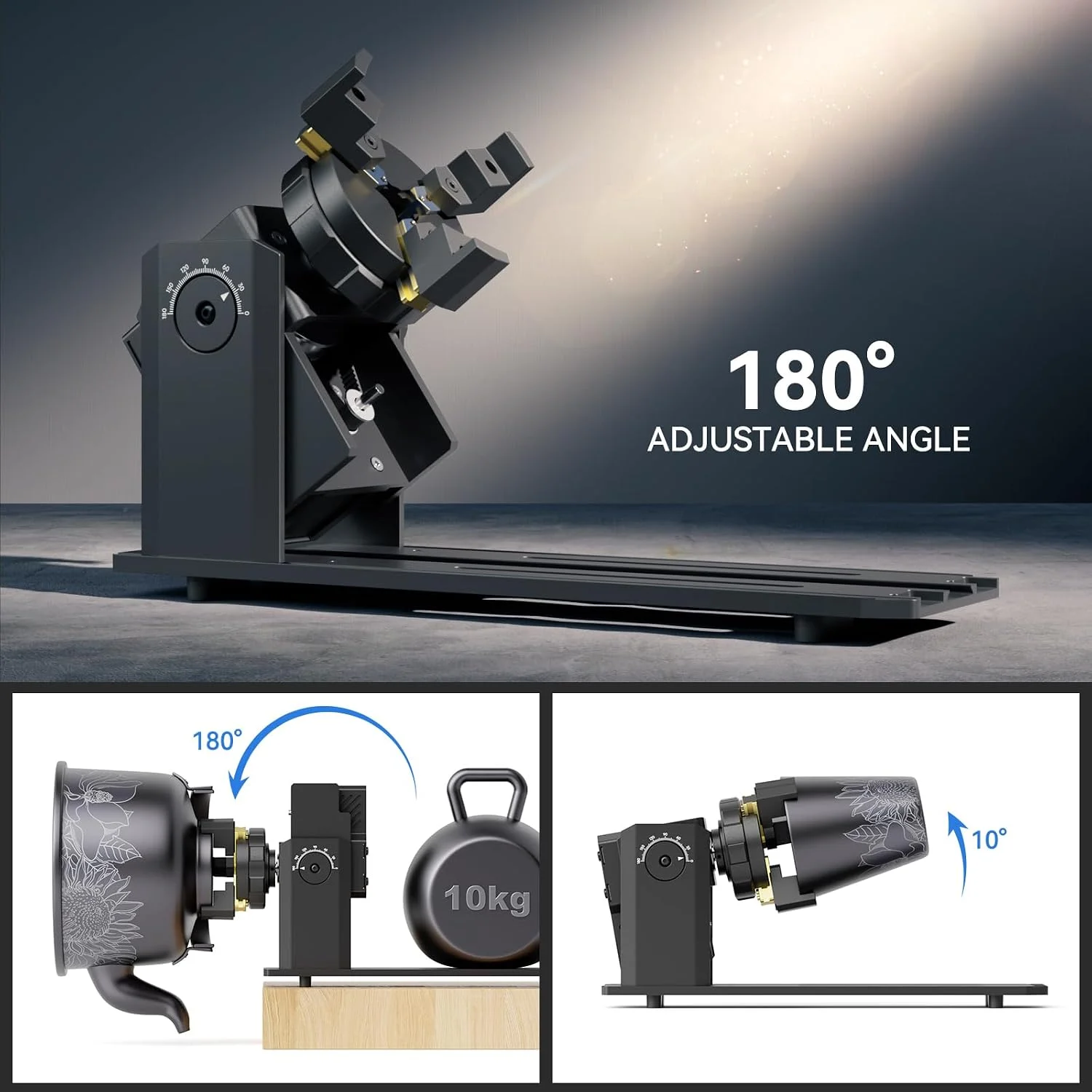
The RA Pro is worth considering for chuck-held rings, spheres and handled drinkware, with interchangeable claws and 180° angle adjustment. Choose the package carefully: the listed RA Pro excludes a powered roller, while Pro Max adds one. That distinction matters more than the shared family name when deciding which shapes your setup needs to hold.

Where it falls short

Setup evidence varies by version. One RA Pro owner needed an external driver for a Sihao galvo. A Pro Max positioning fault cleared after reinstalling LightBurn, but another Pro Max owner reported unresolved tumbler overlap on an S30 Ultra 33W. These cases support checking the exact machine, package and rotary settings; they do not establish a universal connection or fix.

Also compare

  • AlgoLaser ARC Four-in-One Rotary — Compare its listed chuck, roller, sphere and ring modes if you need one package with roller operation, which the standard RA Pro excludes.
  • SCULPFUN R1 Rotary Roller — Compare this roller for cylindrical work: its listing specifies a 6–150 mm range and four 150 mm booster feet, rather than interchangeable chuck jaws.

Will it fit your work?

Seller reference image

Rotary chuck
SCULPFUN RA Pro / Pro Max Rotary: seller reference photoSelected listing ↗

Listed compatibility

Machine / series
SCULPFUN S6SCULPFUN S6 ProSCULPFUN S9SCULPFUN S10SCULPFUN S30 seriesSCULPFUN S30 Ultra seriesSCULPFUN SF A9
Workpieces
Cups & tumblersHandled mugsRingsSpheresTapered drinkware

RA Pro includes chuck, ring and sphere capability but does not include a powered roller.

Buying notes & checks

RA Pro has three jaw sets but no rotating roller. Pro Max adds the roller; select the package you need rather than treating the two kits as identical.

Confirm the controller, motor wiring, driver settings and available height with the seller. A matching connector alone is not a compatibility check.

Score

1 review
72 / 100

Compatibility30/30

Specifications20/20

Pricing evidence5/20

Owner review evidence16.8/30

Why this score

An editorial assessment of compatibility, specifications, pricing and firsthand experience.

Compatibility

Applications documented
7.5/7.5
Laser or machine compatibility
7.5/7.5
Exact package identified
7.5/7.5
Fit limits and exclusions
7.5/7.5

Specifications

Size or capacity documented
10/10
Setup requirements documented
10/10

Pricing evidence

Priced exact package
0/5
Price recency
0/5
Listing identity checked
5/5
Same package cross-checked
0/5

Owner review evidence

Evidence quality
6.8/10
Reported experience
10/20

Reviews: evidence quality contributes 10 points and reported experience contributes 20. We average independent accounts; more reviews do not automatically earn more points. Sample size affects confidence only.

1 independent owner accounts.

0 Positive1 Mixed0 Negative0 No directional verdict

Mixed or unrated accounts use the experience midpoint; they are not counted as positive endorsements.

  • Wazaman · forum.lightburnsoftware.com ↗Mixed · Specific use account

    RA Pro on a Sihao galvo initially would not move; the owner added/configured an external driver and confirms it runs. A custom wiring success, without a measured engraving test or universal compatibility claim.

Sources & fit notes
  • RA Pro includes chuck, ring and sphere capability but does not include a powered roller.
  • Both packages list S6, S6 Pro, S9, S10, S30 series, S30 Ultra series and SF-A9 support; check the Y-axis connection and working height.

How to get started

  1. PART DIAMETER01

    Check fit and wiring

    Confirm the exact connector and machine interface. Check the workpiece and rotary together for bed and laser-head clearance.

  2. ChuckRollerTYPE + MAKER CALIBRATION02

    Configure your rotary type

    Choose chuck or roller in your software and use the maker's calibration values. Do not copy settings from a different rotary model.

  3. TEST A FULL ROTATION03

    Run a small test

    Check rotation and artwork alignment on a test piece before a full wrap. Verify that the part stays secure through the movement.

General setup guidance; it does not establish compatibility with your engraver.

Reviews & discussions

Pro Max adds roller operation to the Pro-style chuck package. A Pro Max owner resolved a positioning problem by reinstalling LightBurn; the roller-free Pro is a separate configuration and should not inherit that case as its own test.

Read sources (2)

Reddit · Owner-reported case

Pro Max positioning recovered after a software reinstall

A Pro Max user initially reports the head driving toward the frame during rotary work. Their follow-up says reinstalling LightBurn restored normal operation. The resolution matters as much as the initial fault.

This case concerns RA Pro Max, not the roller-free RA Pro. Reinstalling software is not a demonstrated fix for every positioning problem.

Read original source: Pro Max positioning recovered after a software reinstall ↗
Diode Laser Wiki · Technical guide

Pro Max adds a roller to the Pro-style chuck

The guide distinguishes the RA Pro chuck package from the Pro Max package, which adds roller operation. Its setup examples help explain why the two packages need separate parts lists and photos.

Community technical guide with shopping links. It is not an independent long-term reliability test; settings remain machine-specific.

Read original guide: Pro Max adds a roller to the Pro-style chuck ↗

Research byResearch updatedResearch method

This comparison covers SCULPFUN RA Pro / Pro Max Rotary using published specifications, recorded seller prices and any available owner evidence.

Selected configuration: RA Pro 3-in-1 rotary chuck · Sculpfun Direct · Original listing ↗

What specifications are published?

Angle adjustment180°
Roller exclusionRA Pro does not include a rotating roller
Connection and setupRA Pro excludes powered roller. RA Pro Max adds roller sharing motor with chuck. Remove roller before chuck-angle adjustment. Both need usable machine clearance; no risers confirmed in captured packages.
Object diameterRA Pro ring: 10–102 mm; sphere: 4–130 mmSource ↗
Full specifications

RA Pro 3-in-1 rotary chuck

Angle adjustment180°
Roller exclusionRA Pro does not include a rotating roller
Connection and setupRA Pro excludes powered roller. RA Pro Max adds roller sharing motor with chuck. Remove roller before chuck-angle adjustment. Both need usable machine clearance; no risers confirmed in captured packages.

Listing 2

Pro Max rollerequipped with a roller that offers two width adjustment optionsSource ↗

Listing 3

Object diameterRA Pro ring: 10–102 mm; sphere: 4–130 mmSource ↗
Source ↗

Common questions

Will it work just because the plug fits?

A connector can fit while the wiring or controller requirements differ. Ask for the pinout and setup instructions for your exact engraver before connecting it.

Which diameter belongs in rotary setup?

Chuck and roller setup use different measurements. Follow your software's instructions for the chosen rotary type rather than treating chuck size, roller diameter and object diameter as the same thing.

Seller support & returns

Check the selected seller's return terms for this exact package. Ask about opened coatings or installed accessories before buying.

Selected listing: Sculpfun Direct ↗
Seller listings (2)

RA Pro 3-in-1 rotary chuck

Check price on AmazonAmazon
View on Amazon

More in this category